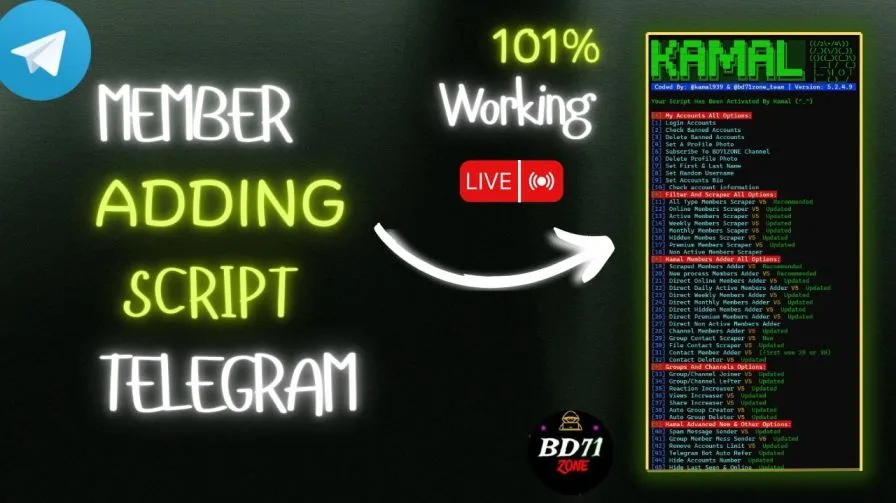
Kamal5.2: Best Telegram Automation Script for Growth and Security
Discover Kamal5.2, the leading Telegram automation script with 52 powerful features. Boost group growth, enhance engagement, and ensure 100% account security. Perfect for marketers and community builders. Contact us to dominate Telegram!
Step into a realm where your Telegram dreams become reality with Kamal5.2, a breathtaking masterpiece of automation that redefines the art of digital dominance. This is not just a script—it’s your golden ticket to unparalleled success, meticulously crafted for trailblazing marketers, visionary community builders, and privacy champions. With 52 revolutionary features, Kamal5.2 empowers you to forge thriving Telegram communities, ignite explosive engagement, and fortify your digital fortress with unrivaled precision. Whether you’re scaling global empires or safeguarding your influence, Kamal5.2 is the ultimate catalyst for your ascent to greatness.
Unmatched Security: Your Peace of Mind with Kamal5.2
Kamal5.2 is engineered with state-of-the-art security protocols to ensure your Telegram accounts remain 100% safe and protected. Every feature is designed with robust safeguards to minimize risks and maximize reliability, giving you the confidence to operate without fear of bans or restrictions. Our advanced error-handling system intelligently navigates Telegram’s limits, ensuring compliance with platform policies and preventing account suspensions. Whether you’re managing multiple accounts or executing high-volume tasks, Kamal5.2 operates within safe boundaries, leveraging sophisticated techniques to keep your operations seamless and secure.
🔑 Key Benefits
● Engagement Boosters : Increase reactions, views, and shares on posts; send personalized messages with media support.
● Secure Account Management : Multi-account login, ban checking, profile customization, and privacy settings like hiding phone/online status.
● Advanced Moderation : Anonymous scam reporting, unban requests, and violation flagging without exposing identity.
● Automation Power : Auto group creation/deletion, bot referrals, spam messaging, and limit removal for ultimate control.
● Universal & Secure : Cross-platform compatibility with state-of-the-art safeguards to ensure 100% account protection.
📥 Get Started with Kamal5.2: Easy Setup Guide
📱 Mobile Setup (Termux on Android)
Transform your Android device into a Telegram automation hub with Kamal5.2 and Termux. This step-by-step guide ensures a quick setup!
1. Download the Script
•
Grab the Kamal5.2 zip from the Download link below.
Run these commands in Termux to enable storage and install Python:
Terminal
termux-setup-storage
Terminal
pkg install python -y
4. Navigate to the Script Folder
•
Move to the extracted folder:
Terminal
cd /sdcard/kamal5.2
Terminal
ls
5. Install Dependencies
•
Prepare the script with:
Terminal
python setup.py
6. Activate Kamal5.2
•
Launch the script:
Terminal
python kamal.py
•
When the script is run, you will be given an activation code.
•
Press Enter, Then you will be sent to @kamal939 Telegram account and there you will have to send the activation code and ask for activation, Then he will activate your script, after his confirmation replay comes, you can check your script and see that the script has been activated.
7. Run & Dominate
•
Execute again:
Terminal
python kamal.py
•
You’re ready to take over Telegram!
💻 PC Setup (Windows, Linux, macOS)
Deploy Kamal5.2 on your computer for professional-grade automation. This guide ensures a smooth setup across platforms.
1. Download the Script
•
Get the Kamal5.2 zip from lthe Download link below.
Ensure “Add Python to PATH” is enabled during installation. Remove other Python versions if necessary.
3. Access the Script Folder
•
Extract kamal5.2 to a location like C:/kamal5.2.
•
Open a terminal:
•
Windows: Right-click the folder and select “Open in Terminal” or use CMD/PowerShell with:
Terminal
cd C:/kamal5.2
•
Linux/macOS: Navigate with:
Terminal
cd ~/kamal5.2
4. Install Dependencies
•
Run:
Terminal
python setup.py
5. Activate the Script
•
Start with:
Terminal
python kamal.py
•
When the script is run, you will be given an activation code.
•
Press Enter, Then you will be sent to @kamal939 Telegram account and there you will have to send the activation code and ask for activation, Then he will activate your script, after his confirmation replay comes, you can check your script and see that the script has been activated.
6. Launch & Excel
•
Run again:
Terminal
python kamal.py
•
You’re set to dominate Telegram with Kamal5.2!
Detailed Feature Breakdown: Your Arsenal for Telegram Supremacy
1. Login Accounts
•
How It Works: Effortlessly logs in multiple Telegram accounts, instantly preparing them for advanced tasks like member scraping or group management. Each account is seamlessly integrated into your workflow, ensuring they’re ready to execute your strategic vision with precision.
•
Benefits:
•
Saves countless hours by automating the login process, freeing you to focus on building your empire.
•
Ensures your accounts are primed for immediate action, maximizing efficiency from the first click.
•
Provides a flawless setup experience, eliminating manual errors and boosting your operational power.
•
How to Use:
1. Before starting, prepare a Number.csv file with phone numbers (e.g., +1234567890, one per line) in the script’s directory.
2. Launch Kamal5.2 and select option 1 from the main menu.
3. If an account requires a verification code, the script will prompt you to enter it (check your Telegram app or SMS).
4. The script logs in each account, displaying real-time status updates in the console (green for success, red for errors like banned accounts).
5. Once completed, accounts are ready for further tasks, with banned accounts logged for review.
How It Works: Conducts a comprehensive audit of your account list, identifying and isolating banned or deactivated accounts to keep your roster pristine. It ensures only active accounts remain, ready for your next move.
•
Benefits:
•
Maintains a lean, high-performance account list, eliminating obstacles to your success.
•
Saves resources by preventing attempts to use unusable accounts, optimizing your workflow.
•
Delivers clear, actionable insights into account health, empowering confident decision-making.
•
How to Use:
1. Ensure Number.csv contains your account phone numbers.
2. Select option 2 from the main menu.
3. The script tests each account’s status, displaying results in the console (green for active, red for banned).
4. Banned accounts are automatically logged to Problem/BanNumber.csv for reference.
5. Review the console for a detailed breakdown of account statuses.
How It Works: Allows you to surgically remove banned accounts from your list, ensuring your account management is streamlined and efficient. It clears out clutter, keeping your setup optimized for peak performance.
•
Benefits:
•
Simplifies account management by eliminating unusable accounts, saving you time and effort.
•
Reclaims valuable storage space, keeping your system agile and responsive.
•
Enhances operational efficiency, ensuring your focus remains on growth and engagement.
•
How to Use:
1. Select option 3 from the main menu.
2. The script displays all accounts in Number.csv with their serial numbers.
3. Enter the serial number(s) of the accounts you wish to delete (e.g., 1 or 1,3,5).
4. Confirm the deletion when prompted.
5. The script removes the selected accounts from Number.csv and deletes their session files, with success confirmed in the console (green).
How It Works: Elevates your accounts’ visual identity by adding professional or unique profile photos, making them stand out in groups and channels. You can use a custom image or let the script generate one for a polished look.
•
Benefits:
•
Builds trust and credibility with visually appealing, authentic profiles that captivate audiences.
•
Offers unmatched flexibility to align photos with your brand or campaign vision.
•
Amplifies engagement by making your accounts instantly recognizable and professional.
•
How to Use:
1. For a custom photo, place a picture.jpg file in the script’s directory; otherwise, the script will generate random images.
2. Select option 4 from the main menu.
3. The script applies the chosen or generated photo to each account in Number.csv.
4. Monitor the console for upload progress (green for success, red for errors like banned accounts).
5. Once completed, your accounts will sport professional new profile photos.
How It Works: Instantly connects you to the exclusive BD71ZONE YouTube channel, your gateway to premium resources, updates, and community insights, with a single click.
•
Benefits:
•
Unlocks a treasure trove of tutorials, tips, and insider knowledge to supercharge your Kamal5.2 experience.
•
Saves time with seamless access to a vibrant community of Telegram innovators.
•
Strengthens your strategic edge by keeping you ahead of the curve.
•
How to Use:
1. Select option 5 from the main menu.
2. The script opens the BD71ZONE YouTube channel (https://m.youtube.com/@BD71ZONE) in your default browser or app.
3. Subscribe to the channel and explore resources to enhance your Telegram strategy.
4. The console confirms the action in green, requiring no further input.
•
Keywords: Telegram BD71ZONE channel, Kamal5.2 community subscription, Telegram support resources
6. Delete Profile Photo
•
How It Works: Removes profile photos from your accounts, restoring a clean, anonymous appearance ideal for privacy-focused operations or rebranding.
•
Benefits:
•
Enhances anonymity, ensuring your accounts operate discreetly in sensitive contexts.
•
Prepares accounts for fresh branding, giving you a blank canvas for new campaigns.
•
Executes with precision, saving time and maintaining operational control.
•
How to Use:
1. Select option 6 from the main menu.
2. The script removes profile photos for all accounts in Number.csv.
3. Monitor the console for deletion progress (green for success, red for errors).
4. Once completed, your accounts will have a clean, photo-free appearance.
How It Works: Personalizes your accounts with custom or automatically generated first and last names, crafting authentic profiles that resonate with your audience.
•
Benefits:
•
Creates lifelike, engaging profiles that build trust and drive interaction.
•
Offers the freedom to customize names or automate for effortless scalability.
•
Elevates your accounts’ professionalism, making them magnets for group and channel engagement.
•
How to Use:
1. Select option 7 from the main menu.
2. Choose between:
•
Option 1: Manual input—enter a first and last name when prompted for each account.
•
Option 2: Automatic generation—the script creates realistic names for all accounts.
3. The script applies the chosen names to each account in Number.csv.
4. Monitor the console for update progress (green for success, red for errors).
5. Your accounts will now have polished, authentic names.
How It Works: Adds a custom bio to your accounts, aligning their profiles with your brand or campaign for a captivating presence.
•
Benefits:
•
Infuses profiles with personality, making them irresistible to group members and followers.
•
Aligns accounts with your strategic vision, from professional to promotional.
•
Drives engagement by crafting bios that resonate and convert.
•
How to Use:
1. Select option 9 from the main menu.
2. Enter a bio (up to 70 characters) when prompted.
3. The script applies the bio to all accounts in Number.csv.
4. Monitor the console for update progress (green for success, red for errors).
5. Your accounts will now have engaging, brand-aligned bios.
•
Keywords: Telegram bio customizer, Kamal5.2 profile bio tool, Telegram account branding enhancer
10. Check Account Information
•
How It Works: Provides a detailed snapshot of your accounts’ details, including usernames, names, and statuses, ensuring you have full visibility into your arsenal.
•
Benefits:
•
Offers instant insights into account health, empowering strategic decisions.
•
Verifies account configurations before critical tasks, ensuring readiness.
•
Simplifies auditing, keeping your operations seamless and error-free.
•
How to Use:
1. Select option 10 from the main menu.
2. The script retrieves and displays details for each account in Number.csv.
3. Review the console for usernames, names, and statuses (e.g., online, offline), with errors in red.
4. Use the insights to plan your next moves with confidence.
•
Keywords: Telegram account info checker, Kamal5.2 profile auditor, Telegram account status tool
11. All Type Members Scraper
•
How It Works: Extracts a comprehensive list of up to 10,000 members from a target group or channel, saving their usernames to a file for strategic use, while filtering out irrelevant data.
•
Benefits:
•
Fuels explosive group growth with a vast pool of potential members.
•
Delivers lightning-fast data collection, even for large communities.
•
Provides clean, actionable data, ready to power your growth campaigns.
•
How to Use:
1. Select option 11 from the main menu.
2. Enter the target group or channel’s username or link (e.g., @GroupName or https://t.me/GroupName).
3. Specify the number of members to scrape (up to 10,000).
4. The script saves usernames to data.csv, excluding bots and deleted accounts.
5. Monitor the console for scraping progress (green for success, red for errors like private groups).
•
Keywords: Telegram member scraper, Kamal5.2 group data extractor, Telegram member collection tool
12. Online Members Scraper
•
How It Works: Targets only online members from a group, capturing up to 10,000 usernames and their “online” status for hyper-targeted community building.
•
Benefits:
•
Builds vibrant groups with active, ready-to-engage members.
•
Maximizes interaction rates by focusing on real-time users.
•
Delivers precision data for elite, high-impact growth strategies.
•
How to Use:
1. Select option 12 from the main menu.
2. Enter the target group’s username or link.
3. Specify the number of online members to scrape (up to 10,000).
4. The script saves online members’ usernames and status to data.csv.
5. Monitor the console for progress (green for success, red for errors).
•
Keywords: Telegram online member scraper, Kamal5.2 active user collector, Telegram real-time data tool
13. Active Members Scraper
•
How It Works: Collects members who were recently active (today or yesterday) from a group, saving up to 10,000 usernames and their status for dynamic growth.
•
Benefits:
•
Creates lively communities with members poised for instant engagement.
•
Drives high interaction rates with fresh, active users.
•
Offers customizable data collection for tailored strategies.
•
How to Use:
1. Select option 13 from the main menu.
2. Enter the target group’s username or link.
3. Specify the number of active members to scrape (up to 10,000).
4. The script saves recently active members’ usernames and status to data.csv.
5. Monitor the console for progress (green for success, red for errors).
•
Keywords: Telegram active member scraper, Kamal5.2 recent user collector, Telegram engagement data tool
14. Weekly Members Scraper
•
How It Works: Gathers members active within the last 7 days from a group, saving up to 10,000 usernames and their “Last Week” status for balanced growth.
•
Benefits:
•
Fuels steady, sustainable growth with moderately active users.
Delivers actionable data for strategic community expansion.
•
How to Use:
1. Select option 14 from the main menu.
2. Enter the target group’s username or link.
3. Specify the number of weekly active members to scrape (up to 10,000).
4. The script saves usernames and status to data.csv.
5. Monitor the console for progress (green for success, red for errors).
•
Keywords: Telegram weekly member scraper, Kamal5.2 semi-active collector, Telegram consistent data tool
15. Monthly Members Scraper
•
How It Works: Collects members active within the last 30 days from a group, saving up to 10,000 usernames and their “Last Month” status for long-term strategies.
•
Benefits:
•
Builds diverse, sustainable communities with semi-active users.
•
Perfect for campaigns targeting periodic engagers for lasting impact.
•
Ensures high-quality, filtered data for strategic planning.
•
How to Use:
1. Select option 15 from the main menu.
2. Enter the target group’s username or link.
3. Specify the number of monthly active members to scrape (up to 10,000).
4. The script saves usernames and status to data.csv.
5. Monitor the console for progress (green for success, red for errors).
•
Keywords: Telegram monthly member scraper, Kamal5.2 long-term collector, Telegram retention data tool
16. Hidden Members Scraper
•
How It Works: Uncovers highly engaged members from a group’s chat history, such as those who posted messages, saving up to 10,000 usernames and their “Hidden Member” status.
•
Benefits:
•
Taps into exclusive, interactive users for premium community growth.
•
Ideal for private groups, delivering niche, high-value members.
•
Drives elite engagement with users already active in discussions.
•
How to Use:
1. Select option 16 from the main menu.
2. Enter the target group’s username or link.
3. Specify the number of hidden members to scrape (up to 10,000).
4. The script saves usernames and status to data.csv.
5. Monitor the console for progress (green for success, red for errors).
•
Keywords: Telegram hidden member scraper, Kamal5.2 private group collector, Telegram chat history data tool
17. Premium Members Scraper
•
How It Works: Extracts Telegram Premium subscribers from a group, saving up to 10,000 usernames and their “Premium” status for exclusive additions.
•
Benefits:
•
Builds prestigious communities with high-value, dedicated users.
•
Elevates group engagement with premium subscribers who invest in Telegram.
•
Delivers precise, filtered data for elite growth strategies.
•
How to Use:
1. Select option 17 from the main menu.
2. Enter the target group’s username or link.
3. Specify the number of premium members to scrape (up to 10,000).
4. The script saves premium subscribers’ usernames and status to data.csv.
5. Monitor the console for progress (green for success, red for errors).
•
Keywords: Telegram premium member scraper, Kamal5.2 elite user collector, Telegram exclusive data tool
18. Non-Active Members Scraper
•
How It Works: Collects members inactive for over 30 days from a group, saving up to 10,000 usernames and their “Long Ago” status for re-engagement or analysis.
•
Benefits:
•
Powers re-engagement campaigns, reviving dormant users for growth.
•
Provides deep demographic insights, unlocking strategic opportunities.
•
Delivers comprehensive data for targeted outreach and planning.
•
How to Use:
1. Select option 18 from the main menu.
2. Enter the target group’s username or link.
3. Specify the number of inactive members to scrape (up to 10,000).
4. The script saves usernames and status to data.csv.
5. Monitor the console for progress (green for success, red for errors).
•
Keywords: Telegram inactive member scraper, Kamal5.2 demographic collector, Telegram re-engagement data tool
19. Scraped Members Adder
•
How It Works: Imports members from a pre-scraped list into your group, adding up to 50 members per account per session (55 daily), ensuring rapid community growth.
•
Benefits:
•
Transforms scraped data into thriving communities with minimal effort.
•
Ensures safe, compliant additions, protecting your accounts from bans.
•
Streamlines growth with automated precision and duplicate tracking.
•
How to Use:
1. Ensure data.csv is populated with scraped usernames (from options 11–18).
2. Select option 19 from the main menu.
3. Enter your group’s username or link.
4. The script adds up to 50 members per account, tracking duplicates in done/ files.
5. Monitor the console for addition progress (green for success, red for errors like privacy restrictions).
•
Keywords: Telegram scraped member adder, Kamal5.2 group growth tool, Telegram bulk member adder
20. New Process Members Adder
•
How It Works: Directly adds members from specified target groups to your group, supporting up to 50 per account and 55 daily, for seamless expansion.
•
Benefits:
•
Accelerates group growth by bypassing the need for separate data collection.
•
Offers flexible configuration for multiple target groups, maximizing reach.
•
Ensures rapid, error-free additions, fueling your community’s rise.
•
How to Use:
1. Edit Setting.ini to list up to five target group usernames under [BD71ZONE_Unhidden_Target].
2. Set Per_account_add (max 50) and Daily_time (min 3 seconds) in [BD71ZONE_Settings].
3. Select option 20 from the main menu.
4. Enter your group’s username.
5. The script adds members from target groups, with progress shown in the console (green for success, red for errors).
•
Keywords: Telegram direct member adder, Kamal5.2 group-to-group tool, Telegram member transfer tool
21. Direct Online Members Adder
•
How It Works: Adds only online members from specified target groups to your group, ensuring instant engagement with active users, up to 50 per account and 55 daily.
•
Benefits:
•
Ignites immediate group interactions with real-time, active members.
•
Builds dynamic, high-energy communities with minimal effort.
•
Automates with precision, ensuring safe and effective growth.
•
How to Use:
1. Configure Setting.ini as in option 20.
2. Select option 21 from the main menu.
3. Enter your group’s username.
4. The script adds online members, with progress shown in the console (green for success, red for errors).
•
Keywords: Telegram online member adder, Kamal5.2 real-time growth tool, Telegram active user adder
22. Direct Daily Active Members Adder
•
How It Works: Adds members active within the last day from target groups to your group, supporting up to 50 per account and 55 daily, for vibrant communities.
•
Benefits:
•
Creates lively groups with freshly active users ready to contribute.
•
Drives rapid engagement with minimal setup, maximizing impact.
•
Ensures targeted growth with automated, error-free execution.
•
How to Use:
1. Configure Setting.ini as in option 20.
2. Select option 22 from the main menu.
3. Enter your group’s username.
4. The script adds daily active members, with progress shown in the console (green for success, red for errors).
•
Keywords: Telegram daily active member adder, Kamal5.2 fresh user growth tool, Telegram recent user adder
23. Direct Weekly Members Adder
•
How It Works: Adds members active within the last 7 days from target groups, with limits of 50 per account and 55 daily, for steady, consistent growth.
•
Benefits:
•
Fosters reliable engagement with a balanced mix of active users.
•
Supports long-term campaigns with consistent, high-quality additions.
•
Automates with duplicate tracking, ensuring seamless scalability.
•
How to Use:
1. Configure Setting.ini as in option 20.
2. Select option 23 from the main menu.
3. Enter your group’s username.
4. The script adds weekly active members, with progress shown in the console (green for success, red for errors).
•
Keywords: Telegram weekly member adder, Kamal5.2 consistent growth tool, Telegram stable user adder
24. Direct Monthly Members Adder
•
How It Works: Adds members active within the last 30 days from target groups, supporting up to 50 per account and 55 daily, for diverse, sustainable growth.
•
Benefits:
•
Builds varied, long-lasting communities with periodic engagers.
•
Enhances group diversity, ensuring sustained interaction.
•
Automates with configurable settings for effortless expansion.
•
How to Use:
1. Configure Setting.ini as in option 20.
2. Select option 24 from the main menu.
3. Enter your group’s username.
4. The script adds monthly active members, with progress shown in the console (green for success, red for errors).
•
Keywords: Telegram monthly member adder, Kamal5.2 long-term growth tool, Telegram diverse user adder
25. Direct Hidden Members Adder
•
How It Works: Adds highly engaged members from target group chat histories to your group, with limits of 50 per account and 55 daily, unlocking exclusive engagers.
•
Benefits:
•
Taps into niche, interactive users for premium community building.
•
Ideal for private groups, delivering high-value, discussion-active members.
•
Drives elite engagement with targeted, error-free additions.
•
How to Use:
1. Configure Setting.ini with target groups under [BD71ZONE_Hidden_Target].
2. Set Per_account_add and Daily_time as in option 20.
3. Select option 25 from the main menu.
4. Enter your group’s username.
5. The script adds hidden members, with progress shown in the console (green for success, red for errors).
•
Keywords: Telegram hidden member adder, Kamal5.2 private group growth tool, Telegram chat-based adder
26. Direct Premium Members Adder
•
How It Works: Adds Telegram Premium subscribers from target groups to your group, supporting up to 50 per account and 55 daily, for prestigious communities.
•
Benefits:
•
Elevates group prestige with high-value, dedicated premium users.
•
Builds exclusive communities with members who invest in Telegram.
•
Ensures precise, automated additions for maximum impact.
•
How to Use:
1. Configure Setting.ini as in option 20.
2. Select option 26 from the main menu.
3. Enter your group’s username.
4. The script adds premium subscribers, with progress shown in the console (green for success, red for errors).
•
Keywords: Telegram premium member adder, Kamal5.2 elite growth tool, Telegram high-value user adder
27. Direct Non-Active Members Adder
•
How It Works: Adds members inactive for over 30 days from target groups, with limits of 50 per account and 55 daily, for re-engagement campaigns.
•
Benefits:
•
Revives dormant users, expanding your group’s reach and potential.
•
Supports niche campaigns with users ready for re-engagement.
•
Automates with precision, ensuring strategic, error-free outreach.
•
How to Use:
1. Configure Setting.ini as in option 20.
2. Select option 27 from the main menu.
3. Enter your group’s username.
4. The script adds inactive members, with progress shown in the console (green for success, red for errors).
•
Keywords: Telegram inactive member adder, Kamal5.2 re-engagement growth tool, Telegram user revival adder
28. Channel Member Adder
•
How It Works: Adds members from target groups to a Telegram channel, requiring admin privileges, with limits of 50 per account and 55 daily, for explosive subscriber growth.
•
Benefits:
•
Skyrockets channel subscribers, amplifying your reach and influence.
•
Ensures seamless additions with admin-verified accounts, minimizing errors.
•
Streamlines growth with automated, high-impact execution.
•
How to Use:
1. Configure Setting.ini as in option 20.
2. Ensure your accounts have admin privileges in the target channel.
3. Select option 28 from the main menu.
4. Enter the channel’s username.
5. The script adds members, with progress shown in the console (green for success, red for errors).
How It Works: Collects contact details (phone numbers, names) from a group’s members, adding them to your accounts’ contact lists for targeted outreach, with tracking for efficiency.
•
Benefits:
•
Builds powerful contact lists, fueling direct marketing and campaign success.
•
Filters out irrelevant data, ensuring clean, actionable contacts.
•
Empowers personalized engagement, driving conversions and loyalty.
•
How to Use:
1. Select option 29 from the main menu.
2. Enter the target group’s username or link.
3. Specify the contact limit per account and delay between additions (in seconds).
4. The script adds contacts and tracks them in done/target_group_contact_done.csv.
5. Monitor the console for progress (green for success, red for errors).
•
Keywords: Telegram group contact scraper, Kamal5.2 outreach data tool, Telegram contact collection tool
30. File Contact Scraper
•
How It Works: Adds contacts from a pre-prepared phone number list, assigning realistic names for authenticity, and tracks them for efficient management.
•
Benefits:
•
Rapidly builds contact lists from existing data, saving time and effort.
•
Enhances account credibility with populated, professional contact lists.
•
Ensures safe, compliant additions, protecting your accounts.
•
How to Use:
1. Create Contact-Number.csv with phone numbers (e.g., +1234567890, one per line).
2. Select option 30 from the main menu.
3. Specify the contact limit per account and delay between additions.
4. The script adds contacts with generated names, tracking them in done/file_contact_done.csv.
5. Monitor the console for progress (green for success, red for errors).
How It Works: Adds existing contacts from your accounts’ contact lists to a group, supporting up to 50 per account and 55 daily, for targeted community growth.
•
Benefits:
•
Leverages known contacts for rapid, high-impact group expansion.
•
Drives engagement with familiar audiences, perfect for niche campaigns.
•
Automates with precision, ensuring safe and effective additions.
•
How to Use:
1. Ensure accounts have contacts (from options 29 or 30).
2. Select option 31 from the main menu.
3. Enter your group’s username, the per-account add limit (max 50), and delay (min 3 seconds).
4. The script adds contacts to the group, with progress shown in the console (green for success, red for errors).
•
Keywords: Telegram contact member adder, Kamal5.2 targeted growth tool, Telegram known user adder
32. Contact Deleter
•
How It Works: Clears all contacts from your accounts’ contact lists, ensuring privacy or preparing for new campaigns, with efficient error handling.
•
Benefits:
•
Enhances privacy by removing outdated or sensitive contacts.
•
Streamlines contact management, keeping your accounts focused and agile.
•
Executes with compliance to Telegram limits, ensuring account safety.
•
How to Use:
1. Select option 32 from the main menu.
2. The script deletes all contacts for each account in Number.csv.
3. Monitor the console for deletion progress (green for success, red for errors).
4. Your accounts will now have clean contact lists.
How It Works: Joins multiple accounts to a specified group or channel, enabling mass participation and boosting visibility with seamless execution.
•
Benefits:
•
Amplifies your presence across communities, driving engagement effortlessly.
•
Scales participation across countless accounts, saving time and effort.
•
Ensures error-free joining, keeping your operations smooth and effective.
•
How to Use:
1. Select option 33 from the main menu.
2. Enter the group or channel’s username or link.
3. The script joins each account in Number.csv to the specified chat.
4. Monitor the console for join progress (green for success, red for errors like already joined).
•
Keywords: Telegram group joiner, Kamal5.2 community participation tool, Telegram mass joiner
34. Group/Channel Lefter
•
How It Works: Allows accounts to exit specified or multiple groups/channels, streamlining your account management and keeping your focus on priority communities.
•
Benefits:
•
Simplifies cleanup, removing accounts from irrelevant or unwanted chats.
•
Offers flexibility to exit single or multiple groups, saving time.
•
Ensures safe operation, respecting Telegram’s restrictions for account protection.
•
How to Use:
1. Select option 34 from the main menu.
2. Choose between:
•
Option 1: Leave a single group—enter the group/channel username or link.
•
Option 2: Leave multiple groups—select from a list of joined groups displayed by the script.
3. Confirm the exit for each selected chat.
4. The script removes accounts, with progress shown in the console (green for success, red for errors).
How It Works: Amplifies post visibility by increasing view counts on single or multiple posts, making them dominate Telegram feeds with real-time tracking.
•
Benefits:
•
Propels posts to the top of feeds, capturing massive audience attention.
•
Delivers live view analytics, optimizing your campaign strategy.
•
Ensures safe, high-impact execution for unmatched visibility.
•
How to Use:
1. Select option 36 from the main menu.
2. Choose between:
•
Option 1: Single post—enter the post link.
•
Option 2: Multiple posts—enter up to 100 post links.
3. The script increases views, displaying live counts in the console.
4. Monitor the console for view progress (green for success, red for errors).
How It Works: Sends customized text, picture, video, or document messages to group members, filtered by category (e.g., online, premium), ensuring targeted communication.
•
Benefits:
•
Drives engagement with tailored, high-impact group messaging.
•
Supports versatile media types, enhancing campaign creativity.
•
Tracks sent messages, ensuring efficient, duplicate-free outreach.
•
How to Use:
1. Create Group-Messege.txt with the message content in the script’s directory.
2. For media messages, prepare the file (e.g., image, video, document) and note its path.
3. Select option 41 from the main menu.
4. Choose the message type:
•
Option 1: Text—uses Group-Messege.txt.
•
Option 2: Picture—enter the image file path and use Group-Messege.txt for caption.
•
Option 3: Video—enter the video file path and use Group-Messege.txt for caption.
•
Option 4: Document—enter the document file path and use Group-Messege.txt for caption.
5. Enter the target group’s username or link.
6. Select the member filter:
•
Option 1: Any category—all members.
•
Option 2: Premium members only.
•
Option 3: Online members only.
•
Option 4: Active within the last 7 days.
7. Specify the message limit per account (max 30) and delay (min 10 seconds).
8. The script sends messages, tracking them in done/messege_send_done.csv, with progress shown in the console (green for success, red for errors).
•
Keywords: Telegram group messaging tool, Kamal5.2 member outreach tool, Telegram targeted communication tool
42. Limit Remover
•
How It Works: Engages with Telegram’s support system to check and request the removal of account restrictions, restoring full functionality for your accounts.
How It Works: Enrolls your accounts in a Telegram bot’s referral program, joining via a referral link to boost the bot’s engagement and your campaign’s reach.
•
Benefits:
•
Amplifies bot growth with automated, scalable referral campaigns.
•
Drives high-impact results with precise, error-free enrollment.
•
Enhances your marketing strategy with effortless referral scaling.
•
How to Use:
1. Select option 43 from the main menu.
2. Enter the bot’s referral link (e.g., https://t.me/BotName?start=12345).
3. The script enrolls each account in Number.csv in the bot’s referral program.
4. Monitor the console for enrollment progress (green for success, red for errors).
How It Works: Submits anonymous reports to the Telegram team for groups or channels violating platform rules, ensuring swift moderation without requiring account credentials.
•
Benefits:
•
Empowers anonymous community protection, safeguarding Telegram’s integrity.
•
Ensures secure, untraceable reporting, maintaining your privacy.
•
Offers flexible reporting options, targeting specific violations with precision.
•
How to Use:
1. Ensure Report-Messege.csv is prepared with report messages for various categories (e.g., Spam, Violence).
2. Select option 48 from the main menu.
3. Enter the group or channel’s username or link.
4. Choose a report category from the displayed list (e.g., Spam, Pornography) or select “Other” to enter custom messages.
•
For “Other”: Specify the number of custom messages and enter each one when prompted.
5. The script submits reports to the Telegram team, with progress shown in the console (green for success, red for errors).
•
Keywords: Telegram anonymous group reporter, Kamal5.2 community moderation tool, Telegram violation reporter
49. Report Scammer Without Account
•
How It Works: Anonymously reports scammer accounts to the Telegram team, addressing violations like fraud or harassment without needing account credentials.
•
Benefits:
•
Protects Telegram users by swiftly reporting malicious actors, fostering trust.
•
Ensures complete anonymity, keeping your identity secure.
•
Customizes reports for targeted, effective moderation.
•
How to Use:
1. Ensure Report-Messege.csv is prepared with report messages.
2. Select option 49 from the main menu.
3. Enter the scammer’s username or link.
4. Choose a report category (e.g., Fraud, Harassment) or select “Other” to enter custom messages.
•
For “Other”: Specify the number of custom messages and enter each one.
5. The script submits reports to the Telegram team, with progress shown in the console (green for success, red for errors).
How It Works: Uses your accounts to report single or multiple posts for violations (e.g., spam, violence), submitting detailed complaints to the Telegram team.
•
Benefits:
•
Enforces community standards with authenticated, high-impact reports.
•
Supports bulk reporting, streamlining moderation across multiple posts.
•
Customizes complaints with precise messaging, ensuring effective action.
•
How to Use:
1. Ensure Report-Messege.csv and Number.csv are prepared.
2. Select option 50 from the main menu.
3. Choose between:
•
Option 1: Single post—enter the post link.
•
Option 2: Multiple posts—enter up to 100 post links.
4. Select a report category (e.g., Spam, Violence) from the displayed list.
5. Choose the message source:
•
Option 1: Custom messages—enter the number of messages and each message when prompted.
•
Option 2: Random messages from Report-Messege.csv.
6. Specify the delay between reports (in seconds).
7. The script submits reports, with progress shown in the console (green for success, red for errors).
How It Works: Uses your accounts to report single or multiple accounts or bots for violations (e.g., spam, fraud), submitting detailed complaints to the Telegram team.
•
Benefits:
•
Combats malicious actors, protecting your community with precision.
•
Scales reporting across multiple accounts, maximizing impact.
•
Customizes complaints for targeted, effective moderation.
•
How to Use:
1. Ensure Report-Messege.csv and Number.csv are prepared.
2. Select option 51 from the main menu.
3. Choose between:
•
Option 1: Single account/bot—enter the username or link.
•
Option 2: Multiple accounts/bots—enter up to 100 usernames/links.
4. Select a report category (e.g., Spam, Child Abuse) from the displayed list.
5. Choose the message source:
•
Option 1: Custom messages—enter the number of messages and each message.
•
Option 2: Random messages from Report-Messege.csv.
6. Specify the delay between reports (in seconds).
7. The script submits reports, with progress shown in the console (green for success, red for errors).
Kamal5.2 is not just a script—it’s a transformative force that redefines what’s possible on Telegram. With 52 meticulously crafted features, it’s the most powerful automation suite ever created, blending growth, engagement, privacy, and moderation into a seamless masterpiece. From scaling vibrant communities to enforcing ironclad standards, Kamal5.2 empowers you to achieve unparalleled success. Its intuitive design and robust performance make it the choice of visionaries who demand excellence.
The value of Kamal5.2 is immeasurable—hours saved, empires built, influence amplified. This is your chance to join an elite circle of Telegram innovators who trust Kamal5.2 to dominate the platform. No matter the investment, the returns are monumental. Don’t wait—contact us at@Kamal939 to secure Kamal5.2 and unleash your Telegram legacy today.
Seize Your Telegram Destiny with Kamal5.2!
Kamal5.2 is your passport to Telegram greatness—a tool that turns dreams into reality. Whether you’re a marketer chasing viral growth, a community leader crafting thriving ecosystems, or a privacy advocate seeking control, this script is your ultimate ally. Its 52 features are a symphony of innovation, designed to make your Telegram presence a global force. The investment? A small price for the legacy you’ll create.
Don’t let the competition outpace you. Take the leap and own the future.Reach out to @Kamal939 now to claim Kamal5.2 and build a Telegram empire that stands the test of time. Your destiny awaits—embrace it with Kamal5.2.
READY FOR THE NEXT STEP
Download this tool
Kamal5.2: Best Telegram Automation Script for Growth and Security
Keep the setup instructions handy as you get started.
Kamal V5 is an advanced Telegram automation tool designed to enhance account management, group growth, and engagement with improved features over Kamal 5.1.
How do I set up Kamal V5 on my device?+
Download the Kamal V5 package from the BD71ZONE website or Telegram channel, extract it with the provided password, install Python, and run "python KamalV5.py" after setting up dependencies.
Is Kamal V5 safe for my Telegram accounts?+
It includes optimized security features to minimize ban risks, but using legitimate accounts and respecting Telegram limits is essential to avoid issues.
Which devices are compatible with Kamal V5?+
It supports Android (via Termux), Windows, Linux, and macOS, requiring Python 3.11 for operation.
Is Kamal V5 available for free?+
No it's not free, with premium features like advanced member adding or bulk messaging Or scammer reporting available through BD71ZONE support.
How do I add members using Kamal V5?+
Use the member adder feature by configuring target groups in the settings file, setting a delay (e.g., 3-5 seconds), and selecting the appropriate menu option.
What should I do if Kamal V5 encounters an error?+
Verify your Python installation, check for banned accounts, and ensure subscription to the BD71ZONE YouTube channel. Contact @kamal939 for support.
Can Kamal V5 automate Report And Ban Scammer groups/channels?+
Yes, it offers tools to Report And Ban Scammer groups/channels using multiple accounts, configurable via the script’s menu.
Where can I get help for Kamal V5?+
Join the @BD71Zone_Team group or message @kamal939 on Telegram for setup assistance or troubleshooting.
Are there usage limits with Kamal V5?+
Yes, daily limits apply to actions like member adding (e.g., up to 50 per account) to ensure account safety and compliance with Telegram policies.
Boost your Telegram channel engagement instantly with our advanced Telegram Auto Views Script. Generate unlimited, free views on your posts in just a minute using Termux. No account login is required. Fast, effective, and automated!
Learn how to get unlimited Telegram subscribers and members for free! Watch our tutorial video, download the secure app, and boost your channel or group instantly without any SMM panel. Fast, safe, and permanent growth guaranteed.
With this free call method, you can make unlimited calls to any number without paying a dime. Hide your real phone number to stay anonymous, perfect for prank calls or testing. Add voice effects for fun pranks, send calls internationally for free